

gemini-3.1-flash-image-preview) on February 26, 2026 — Pro-level quality at Flash-tier speed, pay-as-you-go as low as $0.025/image! View Nano Banana 2 Documentation-preview dropped): Google updated its official docs and released the stable model name gemini-3-pro-image (without -preview). APIYI already supports it.- The old name still works:
gemini-3-pro-image-previewkeeps working as usual, pricing unchanged, no code changes needed. - Both names work: use either the new
gemini-3-pro-imageor the original-previewname.
Latest Versions
- Nano Banana 2.1:
gemini-nano-banana-2.1(🆕 Launched October 6, 2026; an upgrade to Nano Banana 2) — View Details - Nano Banana 2:
gemini-3.1-flash-image-preview(🔥 Launched February 26, 2026) — View Details - Nano Banana Pro:
gemini-3-pro-image-preview(Launched November 20, 2025)
Previous Versions
- Official Release:
gemini-2.5-flash-image(Stable version, supports 10 aspect ratios) - Preview Version:
gemini-2.5-flash-image-preview(⚠️ Discontinued on October 30, 2025)
-
🔥 Nano Banana Pro New Features:
- 🎯 4K High-Resolution Support: Supports 1K, 2K, 4K three resolutions, up to 4096×4096
- 📝 Text Rendering King: Clear and readable text in images, perfect for posters and ads
- ✨ Local Editing: Supports camera angle, focus, color grading, scene lighting adjustments
- 🧠 Smart Reasoning: Based on Gemini 3 Pro, better understanding of complex prompts
-
🚀 Universal Advantages:
- ⚡ Generation Speed: Nano Banana Pro ~20 seconds, previous version ~10 seconds
- 💰 Affordable Pricing: Combined with top-up bonuses, extremely cost-effective
- 🔄 Full Compatibility: Fully compatible with Google official Gemini API format
- 🎨 Google Technology: Based on Google’s latest and strongest image generation/editing technology
Interactive API Testing
Text-to-Image API
Image Editing API
Let an AI Agent Do the Integration
Copy this prompt and paste it into Codex / Claude Code / Cursor
It first fetches the plain-text version of this page (append .md to any docs URL), then writes code in your project's own stack — timeout, defensive parts parsing, upload compression and the resolution parameters are already baked into the requirements.
Integrate / troubleshoot Nano Banana Pro (
gemini-3-pro-image) text-to-image and image editing in this project.Read the docs before you touch code: fetch https://docs.apiyi.com/en/api-capabilities/nano-banana-image/overview.md for the plain-text version of this page. For finer parameter detail, append
.md…
- Timeout: call the Gemini-native format at
POST https://api.apiyi.com/v1beta/models/gemini-3-pro-image:generateContent. Set the client timeout per res …
7 requirements in total. Use the button below to copy the full prompt.
What this prompt saves you from
What this prompt saves you from
Why APIYI’s Nano Banana Pro?
Nano Banana Pro / 2 is the #1 model by usage volume on APIYI — stable, reliable, and fast. If you want to work with a professional team, APIYI is the right choice. Google’s flagship with strict content-safety controls, optimized by APIYI across reliability, cost, and integration:Official Channel · Same as Gemini
/v1beta/models/.../generateContent) and the OpenAI SDK pattern — same request body, response fields, and error codes. Zero-code migration.No Concurrency Limits
31-38% of Google's List Price
Global Zero-Barrier Access
api.apiyi.com from mainland data centers, residential networks, or overseas nodes. Stable latency, no cross-border re-architecture.Full Model Lineup
Professional Enterprise Support
Calling Method
Use Google’s native Gemini API format:Unsupported Features
Price Comparison
Group Setup
Nano Banana Pro ships with two groups on APIYI. Switch in dashboard → Token Settings:NanoBananaEnterprise to ride out the spike.
Recommended Billing model: pick Pay-as-you-go Priority — covers Nano Banana Pro’s per-call billing AND Nano Banana 2’s token-based billing, one Token for the whole series.
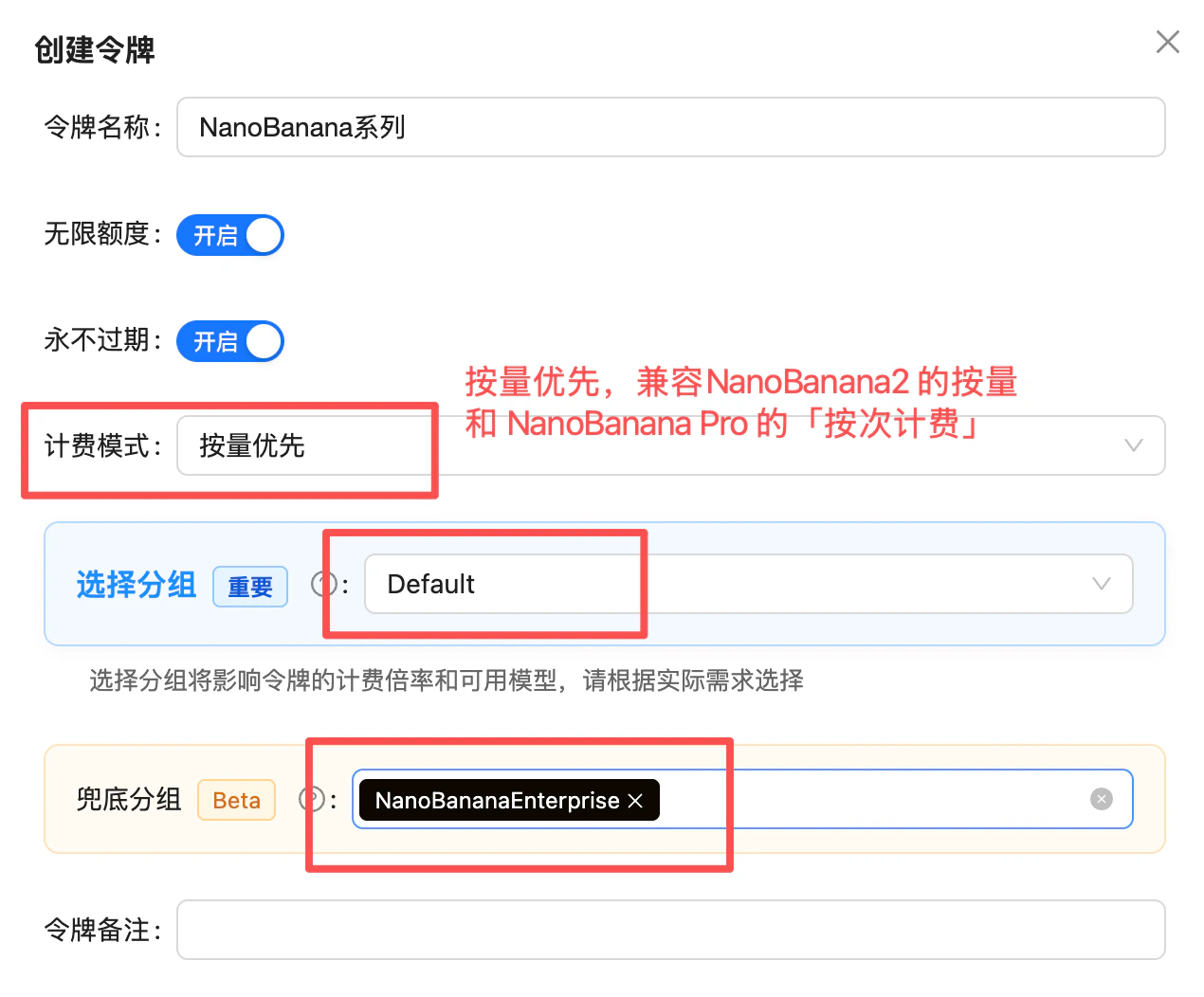
Token settings: Billing model = Pay-as-you-go Priority, primary group = Default, fallback group = NanoBananaEnterprise (1.4x)
Compatibility Notes
If you’ve previously used the following models, simply replace the model name:Upgrade to Latest Version
- Any old version →
gemini-3-pro-image-preview(🔥 Recommended, Nano Banana Pro)- Supports 4K high-resolution output
- Strongest text rendering capabilities
- Local editing features
Use Stable Version
gpt-4o-image→gemini-2.5-flash-imagesora_image→gemini-2.5-flash-image- Old Nano Banana →
gemini-2.5-flash-image
Supported Resolutions & Aspect Ratios
Output Resolutions
Nano Banana Pro supports three resolution tiers — 1K, 2K, 4K (the 512px tier is exclusive to Nano Banana 2):Output Dimensions per Aspect Ratio (pixels)
The table below lists Nano Banana Pro’s actual output dimensions for all 10 aspect ratios across the 1K / 2K / 4K resolution tiers (source: Google official docs). In your request, setaspect_ratio for the ratio and image_size (or resolution) for the tier:
1:4, 4:1, 1:8, 8:1 ultra-tall/ultra-wide ratios or the 512px low-resolution tier, use Nano Banana 2 (14 aspect ratios + 512px).FAQ
Should I choose Nano Banana 2 or Pro?
Should I choose Nano Banana 2 or Pro?
gemini-3.1-flash-image-preview):- Pro-level quality + Flash-tier speed
- Pay-as-you-go as low as $0.025/image
- 14 aspect ratios (4 more than Pro)
- Exclusive: thinking mode, Image Search Grounding
gemini-3-pro-image-preview):- Highest fidelity
- $0.09/request
Should I choose Pro version or legacy version?
Should I choose Pro version or legacy version?
gemini-3-pro-image-preview)✅ Pro Version Advantages:- Supports 4K ultra-high resolution (1K, 2K, 4K)
- Industry-leading text rendering quality
- Advanced local editing features
- Only ~38-67% of official pricing
gemini-2.5-flash-image) suitable for:- Budget-sensitive scenarios (~$0.025/image vs $0.09/image)
- Need fast generation (10s vs 20s)
- Existing project migration
How to switch from other image models to Nano Banana?
How to switch from other image models to Nano Banana?
gpt-4o-image or sora_image to gemini-3-pro-image-preview (recommended Pro) or gemini-2.5-flash-image (legacy), keeping other parameters unchanged.What format are generated images?
What format are generated images?
Does it support image editing features?
Does it support image editing features?
Why do I get connection reset by peer / write_response_body_failed (500)?
Why do I get connection reset by peer / write_response_body_failed (500)?
- Limit the image count: stay within the official rules (max 14 images per prompt) — don’t pile on reference images.
- Limit per-image size: keep each image under 5MB — the official per-image cap is 7MB, and base64 encoding inflates size by roughly 1/3, so leave headroom.
- Compress on the frontend before uploading: compress images on the frontend (or a server-side relay) before sending them to the API — common practice is capping the longest edge, converting to JPEG/WebP, and tuning the quality parameter.
- Switch to URL input: the Gemini native format supports passing an image URL via
fileData.fileUri, sidestepping oversized base64 request bodies entirely — see the Nano Banana Dev Guide.