

Overview
doubao-seedance-2-5-260628 (2.5), doubao-seedance-2-0-260128 (standard), doubao-seedance-2-0-fast-260128 (fast), and doubao-seedance-2-0-mini-260615 (mini/lite) are ByteDance’s latest video generation model family — four models running in parallel, served through APIYI on official Volcengine Mainland China resources (not the BytePlus international edition) with upstream content-safety built in. They support text-to-video, first+last/first frame image-to-video, and multi-modal reference-to-video — and can generate voice, sound effects, and background music synchronized with the visuals. 2.5 is the most capable tier: the duration cap goes from 15 to 30 seconds, reference images from 9 to 30, audio can stand alone as a reference, and it adds mov output plus explicit video-edit/extend task types. It also costs more — roughly 1.5x the 2.0 standard model (about $1.35 versus $0.91 for 720p/5s), matching the gap between the two generations in Volcengine’s own list prices. The 2.0 family stays available and is not being retired: for routine clips under 15 seconds the standard model is cheaper and also supports 1080p; mini is the volume-production pick (about half the standard model’s unit price and faster generation, capped at 720p), with fast in between. 2.5 runs on the sameSeeDance2 group as the 2.0 family (0.18x) — one token reaches all four models. See “Group Setup” below.
-1 for a model-chosen length); three resolution tiers (480p/720p/1080p, where 1080p is limited to 2.5 and 2.0 standard); 6 aspect ratios plus adaptive; synchronized audio on by default; multilingual prompts. Built for short-video production, e-commerce assets, motion design, and virtual-human content at scale.Video Generation API Reference
POST /seedance/api/v3/contents/generations/tasks — async task endpoint with an interactive Playground and full polling/download code.API Manual
Visual API Testing
Async Task Lookup / Download
Let an AI Agent Do the Integration
Copy this prompt and paste it into Codex / Claude Code / Cursor
It first fetches the plain-text version of this page (append .md to any docs URL), then writes code in your project's own stack — async polling, the 24-hour link expiry that forces an immediate copy, the gzip-header trap and the parameter red lines are already baked into the requirements.
Integrate / troubleshoot Seedance 2.5 / 2.0 video generation (text-to-video, first/last frame, multimodal reference, video editing, video extension) in this project.
Read the docs before you touch code: fetch https://docs.apiyi.com/en/api-capabilities/seedance2/overview.md for the plain-text version of this page. For endpoint detail see the video-generation page …
- Use the three-step async flow, not a synchronous wait. Submit to
POST /seedance/api/v3/contents/generations/tasksto get a task ID, poll …
9 requirements in total. Use the button below to copy the full prompt.
What this prompt saves you from
What this prompt saves you from
Why APIYI’s Seedance?
A note on positioning first: this model carries no official discount, and APIYI doesn’t price it for profit — it is offered to secure supply and serve customers. The real value of going through APIYI is not “cheaper”, but access and experience:Official Resource · Mainland Edition
Virtual-face Whitelist Access
Asset Library Included Free
Supply-first Pricing · On Par with Official
Unlimited Concurrency · No Queuing
running immediately with zero queuing (measured 2026-06-06 (UTC+8)) — ready for batch production at scale.Zero-friction Access · No ID Verification
api.apiyi.com directly with a single Token.Professional Support
Key Features
Three Tiers · Same Price per Tier
Synchronized Audio by Default
generate_audio defaults to true: voice, sound effects, and background music are generated to match the visuals. Put spoken lines in double quotes to improve voice-over quality.Up to 30 s Controllable Duration
-1 lets the model pick a length (billed by actual output). On 2.5 the duration default is -1 — omit it and the model chooses for you. Fixed 24 fps.Multilingual Prompts
First+Last / First Frame
return_last_frame to chain clips into longer continuous videos.Multi-modal Reference-to-Video
Async Task Flow
task_id, poll for status, then download the mp4 from content.video_url (link valid for 24 hours).Reproducible Seeds
seed for similar results across runs. watermark defaults to false — output is watermark-free.Pricing
tokens ≈ (input video duration + output duration)(s) × output width × output height × 24 / 1024 (input video duration is 0 for text-/image-to-video; verified in our tests to within 0.1%). Since every ratio in a tier has the same pixel area, price depends only on the resolution tier, output duration, and whether the input includes video.
Official price anchors (16:9 / 5 s output, CNY per video)
① No input video (text-to-video / image-to-video / reference images):video_url; input video 2-15 s, low end ≈ 2-4 s input, high end ≈ 15 s input):
usage.completion_tokens.Worked example (standard model, 1080p, 12 s output + 12 s reference video): 1080p is 1920 × 1080 ÷ 1024 = 2025 tokens per frame; output 24 × 12 + 1 = 289 frames plus 288 input frames = 577 × 2025 = 1,168,425 tokens. At the official with-video-input rate of about CNY 0.031 per 1K tokens that is roughly CNY 36.2; APIYI’s nominal charge is $6.52 (CNY 45.6), about CNY 38.0 for a large-deposit customer after the 20% bonus. This job matches no cell in table ② because the output is not 5 seconds.usage.completion_tokens.
Seedance 2.5 Pricing (SeeDance2 group, 0.18x)
2.5 and the 2.0 family share the same SeeDance2 group and the same 0.18x rate — the gap between generations comes entirely from the models’ own unit prices. 720p/5s costs $1.3721 on 2.5 versus $0.9074 on the 2.0 standard model, roughly 1.5x. That gap mirrors Volcengine’s own list prices (their 2.5 token rate is about 52% above 2.0); it is not an APIYI markup. Whether the upgrade is worth it comes down to whether you actually need 30-second clips, 30 reference images, mov output, or video editing/extension — if you do not, the 2.0 standard model is cheaper and also supports 1080p.
① No video in the input (text-to-video, image-to-video, reference images):
video_url, video editing, video extension): billed at a separate, lower token rate.
SeeDance2 group at 0.18x, so they can be compared directly.
- Final charges follow the console’s model pricing and call logs
- Tasks are pre-charged on submission and settled on completion — your balance fluctuates briefly; reconcile against call logs, where one video produces two charge entries (see “Reading charges in the logs” below)
- The hold is based on duration alone, independent of resolution: $0.09/second for the 2.0 family, $0.135/second for 2.5. That is why 1080p usually settles with an extra charge and 480p usually gets a partial refund — both are normal
- Rejected requests (HTTP 400 parameter errors, etc.) are not billed (verified)
- Cost scales linearly with duration: a 15 s video costs about 3× a 5 s one
Reading charges in the logs (pre-charge + settlement)
Open the console log page atapi.apiyi.com/log and search for the model name doubao-seedance-2-0 to see every charge. One video produces two charge entries:
- Pre-charge: an estimated amount deducted when the task is submitted (log entry labeled “non-streaming”, showing the token and group) — $0.449998 in the screenshot below
- Settlement (charge or refund): after the task completes, the difference is settled against the actual generated tokens (log entry labeled “streaming”, with a completion-token count) — $5.611858 below; 1080p usually incurs an additional charge
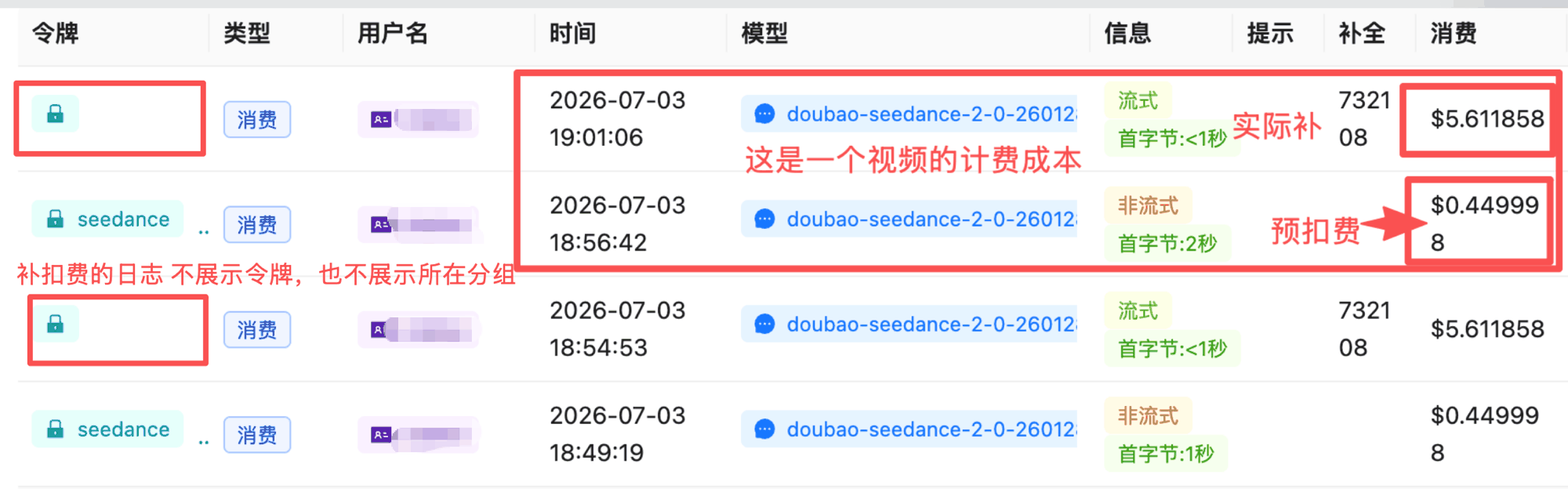
Two charge entries for one 15 s 1080p video: pre-charge + settlement
- The first entry’s (pre-charge) timestamp is the video’s submission time; its “first byte” value is how long the submission took to return a task ID (e.g.
首字节:3秒/ first byte: 3 s) — not the generation time - The settlement entry shows
流式(streaming) and首字节:<1秒(first byte under 1 s) — these are just internal markers on the settlement record, not a sign of any problem - The video’s actual generation time is the “耗时” (elapsed) column on the “Async tasks” page (
api.apiyi.com/task) in the top navigation
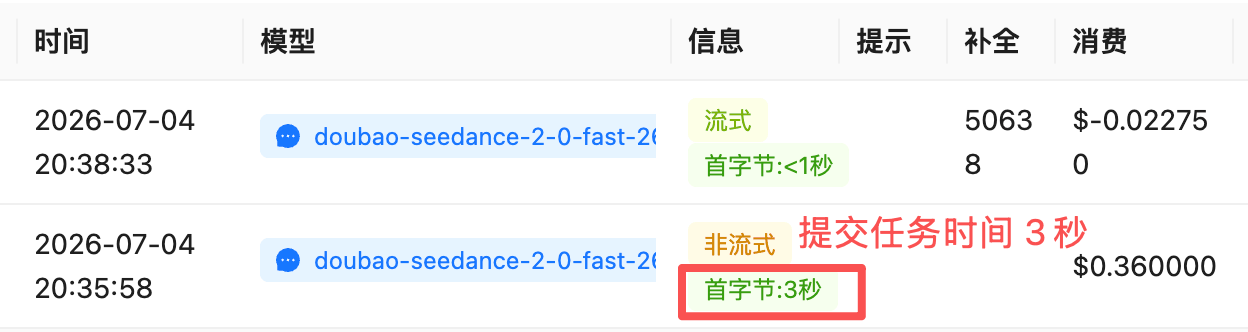
The first log entry's timestamp = submission time, and its first-byte value (3 s) is the submission latency; this fast example settled as a refund (negative amount), total cost 0.360000 − 0.022750 = 0.337250 USD
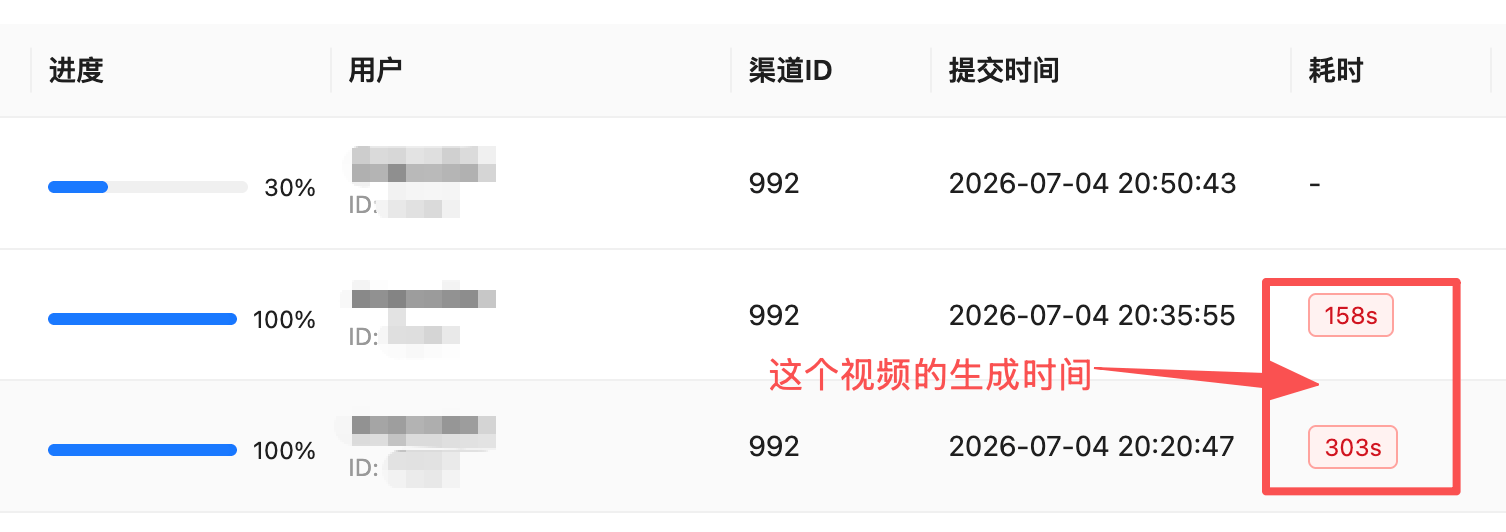
The elapsed column on the Async tasks page is the actual video generation time, e.g. 158 s, 303 s
api.apiyi.com/task, and they line up exactly with the charges:
Looking up one video’s cost by task ID: use the task API
For programmatic reconciliation, do not try to pair log entries one by one: neither of a video’s two log entries carries thetask_id, and the settlement entry has an empty request_id (this is how it works on the documented /seedance/api/v3/... path). Use the task API and query by task_id directly, authenticated with the same system token as the Log Query API:
quota is the video’s total cost (pre-charge + settlement, ÷ 500,000 = USD). It is the same number you get by adding the two log entries, and the same quota shown in the task detail on the “Async tasks” page. Interpret it by status:
/seedance/api/v3/.../tasks/{id} reports success as succeeded, while the task API /api/task/self reports it as completed.
If you must cross-check manually in the Log Query API: the settlement entry’s timestamp equals the task’s finish_time (within 1 second), its completion_tokens equals the task’s usage.completion_tokens, other.final_quota equals the task’s quota, and other.original_quota is the pre-charge. When several tasks are submitted in the same second their pre-charge entries collide, so this only works for manual checks, not for automated pairing. Full walkthrough: How to look up a video’s real cost by task_id.
Group Setup
Seedance 2.5 and the 2.0 family run on a dedicated group, with two hard requirements: ① the Token’s billing model must be Pay-as-you-go Priority (or Pay-as-you-go) — Pay-per-request tokens cannot route; ② the Token must have the matching group enabled. Tokens on the Default group or other video groups will fail with “no available channel for this model”. 2.5 and the 2.0 family shareSeeDance2 — that is the only group a new Token needs. Two single-model groups, SD2Mini / SD2Fast, are left over from the earlier limited-time discount; since 2026-10-08 12:00 (UTC+8) they are back at the same 0.18x as SeeDance2:
SeeDance2 token reaches all four models: 2.5 and the three 2.0-family models all live in this group, so your code only changes the model field.SD2Mini / SD2Fast are single-model channels: SD2Mini carries only mini and SD2Fast only fast, so calling any other model through them returns the same error. If you already have such Tokens, keep using them — the price matches SeeDance2. To reach every model with one Token, switch to a Token with SeeDance2 enabled.How to set up your Tokens
Create one Token with theSeeDance2 group enabled — it reaches all four models, and your code only changes the model field. The billing model must be Pay-as-you-go Priority (or Pay-as-you-go). For production, consider one Token per business line so you can cap quota, set alerts, and trace unexpected spend.
doubao-seedance-2-5-260628, on the same SeeDance2 group (0.18x) as the 2.0 family. Endpoint, auth, and request shape are identical to 2.0 — swap the model field and your code keeps working. Against the 2.0 family: duration cap 15 s → 30 s, reference images 9 → 30, reference videos/audio 3 → 10, audio usable on its own, plus mov output and the omni_reference_task_type task selector. It runs at roughly 1.5× the 2.0 standard model. See “Technical Specs” below for the full diff.Technical Specs
API Endpoints
Resolutions & Aspect Ratios in Detail
A resolution tier defines the pixel area, not the short side. Actual output dimensions per ratio (official values, verified in our tests):4k — sending "resolution": "4k" returns a synchronous 400 (not billed).How adaptive works
- Text-to-video: the model infers the best ratio from your prompt
- First+last / first frame: matches the first-frame image’s ratio (mismatched images are center-cropped)
- Multi-modal reference-to-video: follows prompt intent, otherwise the first media item (video takes priority over images)
- Video editing / extension (2.5): the output ratio follows the input video being edited or extended
- The actual ratio used is returned in the task response’s
ratiofield
Best Practices
Pick the model by output needs
doubao-seedance-2-5-260628 (roughly 1.5× the standard model’s price, same group as the 2.0 family). If not, stay on the 2.0 family: for batch production and cost-sensitive workloads use the lite model doubao-seedance-2-0-mini-260615 (about half the standard price and the fastest generation, capped at 720p); for 1080p or top quality use the standard model; fast is the middle ground.Ingest images and video to asset IDs first
asset:// asset ID, and reference that — the request body shrinks to a few dozen bytes, the task ID comes back immediately, and content checks move up to ingest time. See Asset-First Workflow.Use adaptive to avoid cropping
adaptive so the model matches your source image’s ratio. Lock 9:16 (portrait) or 16:9 (landscape) only when the target platform demands it.Duration is your cost dial
duration explicitly — its default is -1, so omitting it lets the model choose, and in testing it chose 10 seconds, doubling the cost.Turn audio off when you don't need it
generate_audio defaults to true. Pass false for silent footage you plan to score yourself.Quote dialogue for better voice-over
Add Accept-Encoding: identity in HTTP clients
content-encoding: gzip while the body is uncompressed; auto-decompressing clients such as Python requests raise ContentDecodingError. Adding the Accept-Encoding: identity header avoids this (curl is unaffected).Poll every 15-30 s and download immediately
content.video_url is a signed link valid for 24 hours — copy the file to your own storage as soon as the task succeeds.Chain clips with return_last_frame
return_last_frame: true to get a watermark-free last-frame png, then use it as the next task’s first frame to build continuous multi-clip videos.Error Codes & Retries
- 30-60 s request timeouts are enough for create/poll calls (the wait happens on the task side)
- Poll every 15-30 s with an overall budget of 15+ minutes (longer for 1080p / 15 s tasks)
- Apply exponential backoff on 5xx and timeouts (2 retries)
- Log the task
idand theX-Shellapi-Request-Idresponse header (the APIYI request ID, searchable in the logs;X-Request-Idis the provider-side one) for troubleshooting
FAQ
Why does a request with images or video take so long to return a task ID, or time out?
Why does a request with images or video take so long to return a task ID, or time out?
asset:// asset ID, which drops the request body from megabytes to a few dozen bytes. For the latency breakdown, migration steps, and how to tell whether a task was created after a timeout, see Asset-First Workflow.Seedance 2.5 or 2.0 — which should I use?
Seedance 2.5 or 2.0 — which should I use?
omni_reference_task_type). 2.5 also allows audio as the only reference, where 2.0 requires an image or video alongside it.Stay on the 2.0 family when your clips are under 15 seconds — the standard model also supports 1080p and sits in the same flagship quality tier; for cost-sensitive batch production use mini at about half the standard unit price and the fastest generation. The 2.0 family is not being retired.Endpoint, auth, and request shape are identical across generations, and so is the group — switching means changing one field: model.Does 2.5 support 1080p? What about 4k?
Does 2.5 support 1080p? What about 4k?
"resolution": "4k" returns a synchronous 400 (not billed).One easily missed difference: 2.5 encodes 1080p as H.265 (hvc1), while 480p and 720p use H.264 (avc1). H.265 files are smaller, but older players, some browsers, and certain editing suites handle it less reliably than H.264 — confirm your downstream pipeline can decode it before distributing 1080p.How do I run video editing and video extension on 2.5?
How do I run video editing and video extension on 2.5?
content plus the intent expressed in your prompt. Pass omni_reference_task_type explicitly so errors surface early:- Video editing:
omni_reference_task_type: "edit", at least onerole: "reference_video",ratiomust beadaptiveanddurationmust be-1, and the source video must run 4-30 seconds. The prompt needs an editing verb (add, remove, delete, change, replace). Output ratio and duration follow the input video — and the duration can be fractional (a measured run returned 16.709 seconds). - Video extension:
omni_reference_task_type: "extend", again with a reference video andratioset toadaptive. The prompt needs an extension verb (extend, continue).
@video1, @image1 — in the order you passed them. Invalid parameters return a 400 at submission (InvalidParameter.TaskTypeConstraint) rather than failing the task minutes later.What is the mov output format on 2.5 for?
What is the mov output format on 2.5 for?
"output_format": "mov" returns a QuickTime container (H.264 + yuv444p chroma + PCM audio) with higher colour and luminance fidelity — suited to grading, keying, and compositing, and recommended officially as both input and output for video editing / extension work. The default is mp4, which has the broadest compatibility.Note that mov uses professional codecs some players cannot open (VLC, mpv, ffplay, and IINA on macOS all handle it). For direct web or mobile distribution, stay on the default mp4.I get 'no available channel for this model' — why?
I get 'no available channel for this model' — why?
SeeDance2 enabled reaches all four models (existing SD2Fast / SD2Mini Tokens can still call their single model, at the same price). The billing model must also be Pay-as-you-go Priority or Pay-as-you-go — Pay-per-request Tokens cannot route.Python requests raises gzip errors / returns truncated non-JSON bodies
Python requests raises gzip errors / returns truncated non-JSON bodies
content-encoding: gzip header does not match the actual body encoding. Symptoms include ContentDecodingError, a truncated non-JSON body (e.g. the leading {" is lost and you only get id":"cgt-xxx"}), or intermittent 400s. Add "Accept-Encoding": "identity" to your request headers; curl and browser fetch are unaffected.Why does my video have sound? How do I turn it off?
Why does my video have sound? How do I turn it off?
generate_audio defaults to true (verified): the model adds voice, sound effects, and background music automatically. Pass "generate_audio": false explicitly for silent output.Where is the video URL, and why does it stop working?
Where is the video URL, and why does it stop working?
content.video_url in the poll response (not top-level). It is a signed link valid for ~24 hours — download and re-host it immediately. The task_id itself remains queryable for 7 days.What is the success status value?
What is the success status value?
queued → running → succeeded / failed / expired. The success state is succeeded, not completed — an easy mistake when migrating from other video APIs.Can I upload photos of real people for image-to-video?
Can I upload photos of real people for image-to-video?
asset:// IDs), or use licensed face assets.Does the asset library cost extra?
Does the asset library cost extra?
Am I billed for failed or rejected requests?
Am I billed for failed or rejected requests?
How do I estimate token usage? Is portrait more expensive?
How do I estimate token usage? Is portrait more expensive?
tokens ≈ duration(s) × width × height × 24 / 1024, verified to within 0.1%. Every ratio in a tier has the same pixel area (720p 16:9 and 9:16 both cost 108,900 tokens per 5 s) — landscape, portrait, and square all cost the same.Within the 2.0 family — standard vs fast vs mini?
Within the 2.0 family — standard vs fast vs mini?
What does duration: -1 do?
What does duration: -1 do?
duration field.Note that -1 is the default on 2.5 (the 2.0 family defaults to 5 seconds) — omitting duration therefore opts you into model-chosen length, and a measured 2.5 request with no duration returned a 10-second clip, exactly twice the cost of 5 seconds. Pass duration explicitly if cost predictability matters.Is the frames parameter supported for fractional seconds?
Is the frames parameter supported for fractional seconds?
frames and camera_fixed are Seedance 1.x parameters — supported by neither Seedance 2.5 nor the 2.0 series. Use whole-second duration instead.Can I mix first+last frame, first frame, and reference images?
Can I mix first+last frame, first frame, and reference images?
first_frame/last_frame roles), first frame (1 image), and multi-modal reference-to-video (image role reference_image). To approximate “first/last frame + reference”, use reference mode and designate a frame via the prompt.Reference limits differ by generation: 2.5 takes 30 images + 10 videos + 10 audio clips, and audio may stand alone; the 2.0 family takes 9 images + 3 videos + 3 audio clips and needs at least 1 image or 1 video alongside any audio.Are there concurrency limits or queues?
Are there concurrency limits or queues?
SeeDance2 group has ample concurrency with no queuing (15 simultaneous tasks all ran immediately in our test). Contact sales for larger sustained workloads.Any prompt limitations?
Any prompt limitations?
Related Docs
- Video Generation API Reference & Playground -
POST /seedance/api/v3/contents/generations/tasks - Asset-First Workflow - How to make create-task return instantly when a request carries media, and what to do after a timeout
- VEO 3.1 Video Generation - Google official video channel
- Top-up Bonuses - effective cost about on par with the official channel
- API Manual - general calling conventions