

moderation: low does nothing, and a method that finds the trigger word in about 20 calls.
The case: web app renders, API returns sexual
A customer usedgpt-image-2.5-sunburst to generate a character sheet (face close-up on the left, front / side / back turnaround on the right). The request:
I get that it is content safety, but the same thing works in the ChatGPT web app. You have to tell me why the web app passes.Nothing in the prompt is explicit. It is just “glamorous woman + turnaround + white background”. A ticket of the form “I did not write anything bad but got blocked” needs a completely different approach from “I wrote something bad and got blocked”.
First: which layer is blocking?
Image models have two safety gates. They fail differently and are debugged differently:
Latency is the tell. In this case the failed calls took 42 to 51 seconds and the successful ones 46 to 57 seconds. No difference, so the image was fully rendered and the output-side classifier flagged it as sexual. The ablation below confirms it: one prompt run three times came back 1 pass / 2 rejects.
A prompt-level block returns about as fast as a parameter error. If your 400 arrived after half a minute or more, treat it as an output-image block first, and do not start deleting words yet.
Why the web app passes
This is the same point made in How to Get Satisfying Images: the web app is an agent, the API is a single atomic call.- The ChatGPT web app does not feed your text to the image model verbatim. The chat model rewrites and expands the prompt first, and it usually fills in clothing, setting and lighting on its own. That is exactly the “add clothing” step described below, done for you.
- The API sends your prompt as-is. You did not say what she wears, so the model decides. Under “glamorous + full-body turnaround + white background” it leans toward a tight or minimal outfit, which is what a character sheet often looks like, and the render crosses the line.
- Add the randomness of output-side moderation on top, and “web app passed once, API failed once” is not a contradiction.
Word ablation: change one thing at a time
A prompt like this has a dozen adjectives and layout constraints. Guessing which one is at fault is slow. The effective approach is ablation: remove or replace exactly one word block per variant, keep everything else byte-identical, and watch which variant flips the result.1
List the suspect word blocks
Three buckets: character adjectives (glamorous, sexy, alluring…), body-related verbs (reveal, show, form-fitting…), and layout constraints (full body, turnaround, white background…). Layout constraints look harmless alone but combine with the adjectives.
2
Change exactly one block per variant
Delete it or swap in a neutral word, leave the rest untouched. Also run a variant that changes no words and only adds a constraint, such as an explicit outfit for the character.
3
Re-run any flip 2 to 3 times
Output-side blocks are stochastic, so one pass proves nothing. Re-run the winning variant at least twice more and only count it if every run passes.
4
Take the smallest edit
The goal is not “it passes” but “it passes with the least change of intent”. Prefer variants that keep the original words and only add a constraint.
Three things fall straight out of the table: the trigger is “glamorous” (removing “mature-looking” changes nothing, removing “glamorous” passes); “reveal” is not the cause; and the “refined features” row at 1 pass / 2 rejects shows the classifier is judging a different render each time, not the text.
Conclusion and recommended fix
Mechanism: “glamorous” pushes the model toward a sensual rendering, and “full-body turnaround + white background” is the classic character-sheet layout. Together they produce renders the output-side classifier flags as sexual. Not a single word in the prompt is itself a violation. Recommended fix: keep the entire original prompt and add one explicit clothing phrase right after the character description. This passed 3 of 3 runs and kept both the look and the layout the customer wanted: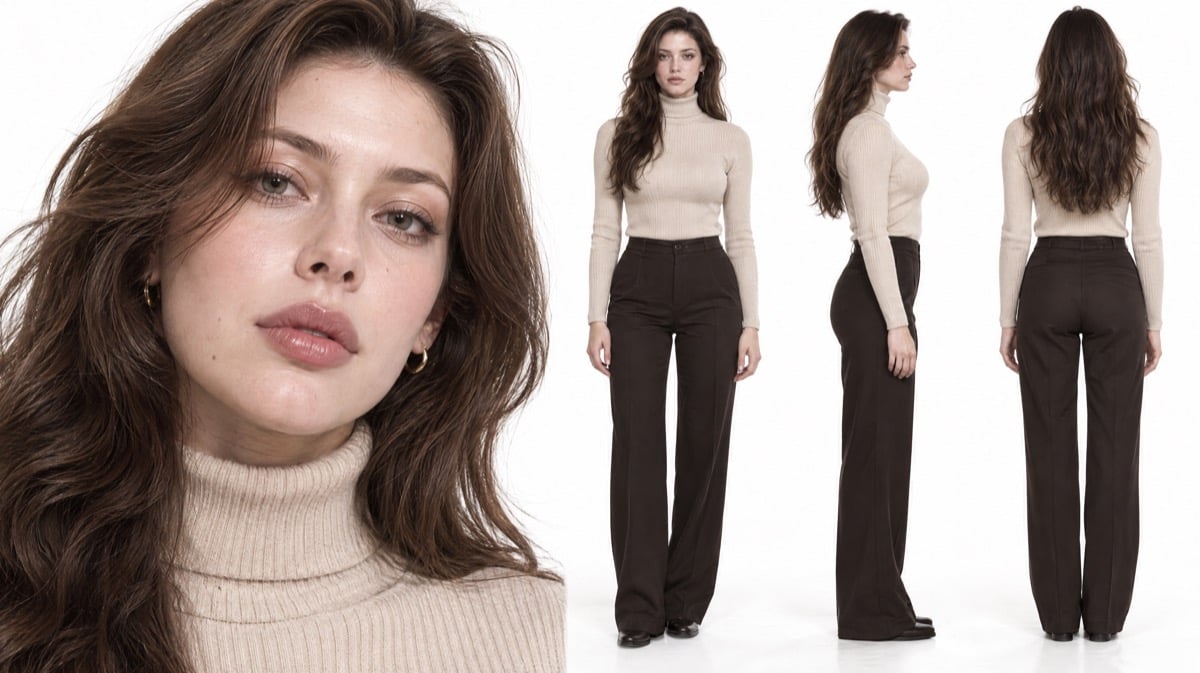
Same prompt with one clothing phrase added: 3 of 3 calls passed, with the face close-up and the front / side / back turnaround all delivered
Why moderation: low did not help
Themoderation parameter (see the text-to-image parameter table) accepts auto / low and lowers the strictness of prompt-side moderation. Passing low here still returned 400, because the block happens on the output side, which this parameter does not control.
From outside the gateway we cannot tell “the parameter was not forwarded” from “it was forwarded and had no effect”, but the conclusion is the same either way: for an output-side block, changing parameters does nothing; change the prompt.
General checklist
Did the error come back instantly, or after a long wait?
Did the error come back instantly, or after a long wait?
Instant means prompt-level; a wait comparable to a normal render means output-level. For the former, remove the obviously violating word. For the latter, run a word ablation to find what pushes the render over the line, and expect some randomness on the same prompt.
Did you leave the outfit up to the model?
Did you leave the outfit up to the model?
Character prompts that describe mood but not clothing are the most common source of output-side blocks. One explicit clothing phrase usually fixes it in a single step without touching the original intent.
Did you change only one word at a time?
Did you change only one word at a time?
Change three words at once and you will not know which one mattered, so the next prompt starts from scratch. One block per variant, then re-run any winner 2 to 3 times.
Are blocked requests billed?
Are blocked requests billed?
Token-billed gpt-image models are not billed when moderation returns 400. See the gpt-image-2 FAQ entry on failed generations. An ablation therefore costs time, not money.
Quick reference
- Use latency to find the layer: an instant 400 is prompt-level; a 400 that took as long as a render is the output-side classifier rejecting the image.
- Output-side blocks are stochastic: the same prompt passes sometimes and fails sometimes, so a single result proves nothing. Re-run 2 to 3 times.
- The web app passing does not mean the API is stricter: the web app rewrites and expands the prompt (adding clothing, setting), the API sends it verbatim.
- Word ablation: change one block per variant, run variants in parallel, keep the edit with the least change of intent. Here the trigger was “glamorous”.
- Spell out clothing in character prompts: one added clothing phrase with everything else untouched passed 3 of 3;
moderation: lowdoes nothing for output-side blocks.