

Overview
This is a custom Python plugin for the Coze platform (coze.cn) that wraps OpenAI’s GPT Image 2 model (gpt-image-2) through the APIYI gateway into a node that Coze workflows can call directly. The plugin ships with complete request construction, error-code classification, content-safety filtering detection, and an Alibaba Cloud OSS upload pipeline. It returns a publicly accessible URL ready for display, saving you from building another result-forwarding step in your Coze workflow.
- 📦 Distribution: shared as a code package (not published on GitHub)
- 👤 Author: community contribution
- 🎯 Target platform: Coze (China / global) custom plugins
- 🔌 Model called:
gpt-image-2(APIYI, released April 21, 2026) - 🌐 Gateway: APIYI — direct access from mainland China, no VPN required
- 📝 The full source code is provided in the ‘Full Plugin Source Code’ section below, ready to copy and use
About the APIYI Gateway
APIYI is a gateway for GPT Image 2 with direct connectivity from mainland China, offering three routes that share a single API Key:This plugin usesgpt-image-2(official relay) by default, fully compatible with the official OpenAI API and supporting full parameter control. If you need faster generation, switch togpt-image-2-allmode (see below).
Core Features
Unified text-to-image / image-to-image entry
Direct access from mainland China, no VPN
Multi-reference-image editing
Fine-grained error classification
Two-stage content-safety detection
Direct OSS upload
Fine parameter control
Supported Models
GPT Image 2 Key Specs
API Endpoints
To switch routes:https://vip.apiyi.com/v1/...orhttps://b.apiyi.com/v1/.... All routes are functionally identical.
Plugin Architecture
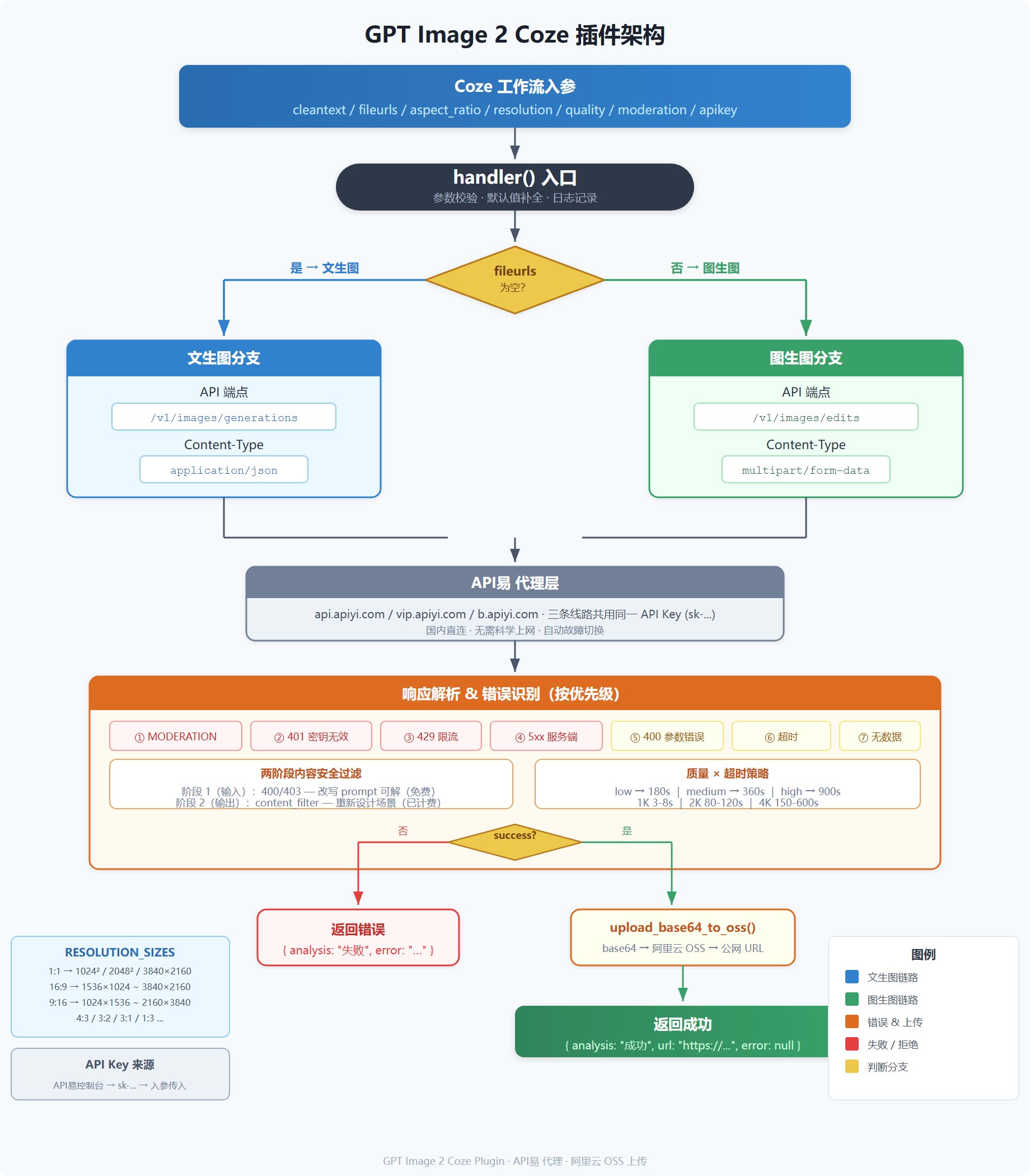
Resolution and Size Reference
The plugin selects the size automatically fromaspect_ratio and resolution (based on APIYI’s official presets):
Constraints: every dimension must be divisible by 16, aspect ratio ≤ 3:1, total pixels ≤ 8,294,400.
Note: 1:1 at 4K outputs 3840×2160 (landscape 16:9), not a square — this is an API limitation, and the effective aspect ratio becomes 16:9. Outputs above 2560×1440 are still experimental; for production, prefer the preset sizes.
Input and Output Parameters
Input (Input)
Output (Output)
Deployment Steps
Step 1: Prepare an APIYI API Key and OSS credentials
- Request an API Key (starting with
sk-) in the APIYI console; we recommend setting a daily quota limit (e.g. ¥20-50) - Create an OSS bucket on Alibaba Cloud and a RAM sub-account with
oss:PutObjectpermission on that bucket - Record the
AccessKey ID,AccessKey Secret,Bucket name, andEndpoint(e.g.oss-cn-beijing.aliyuncs.com)
Step 2: Search for and install the plugin in the Coze plugin marketplace
- Go to Coze workspace → Plugins → Plugin marketplace
- Search for ‘GPT Image 2’ or ‘APIYI’ to find this plugin
-
Open the plugin card to review the details, then click ‘Add’ to install it into your workspace
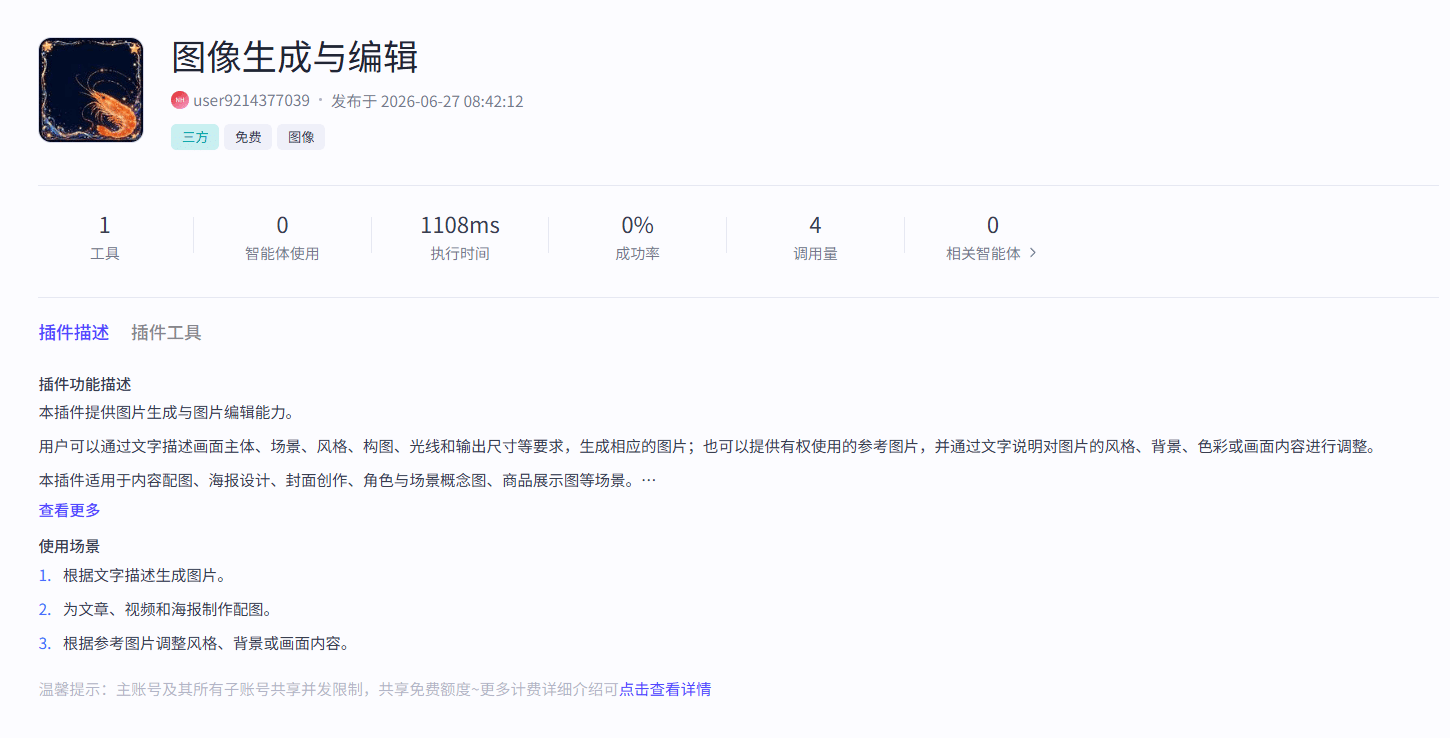
Step 3: Copy the plugin code
Step 4: Configure metadata and input/output parameters
args.input fields in the code:Input parameter configuration: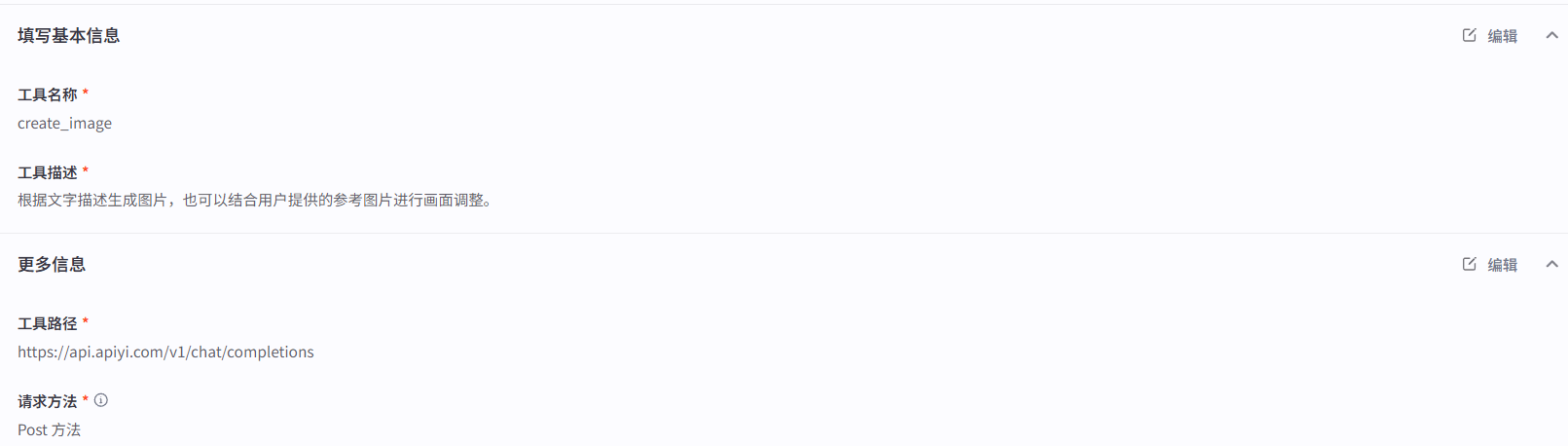
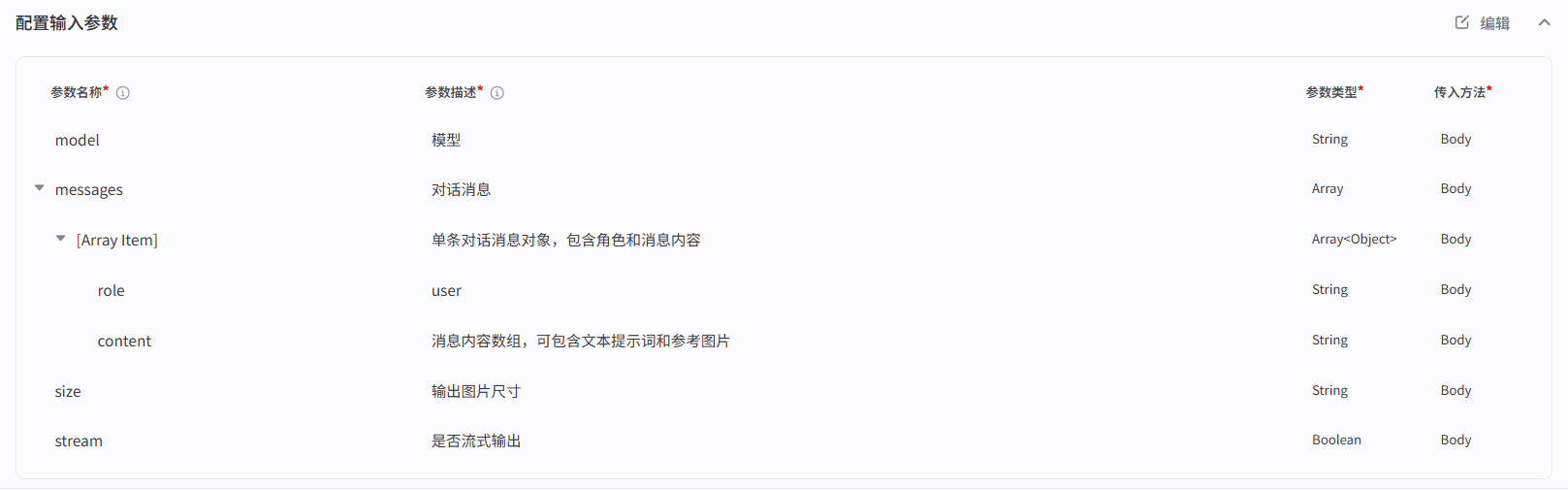
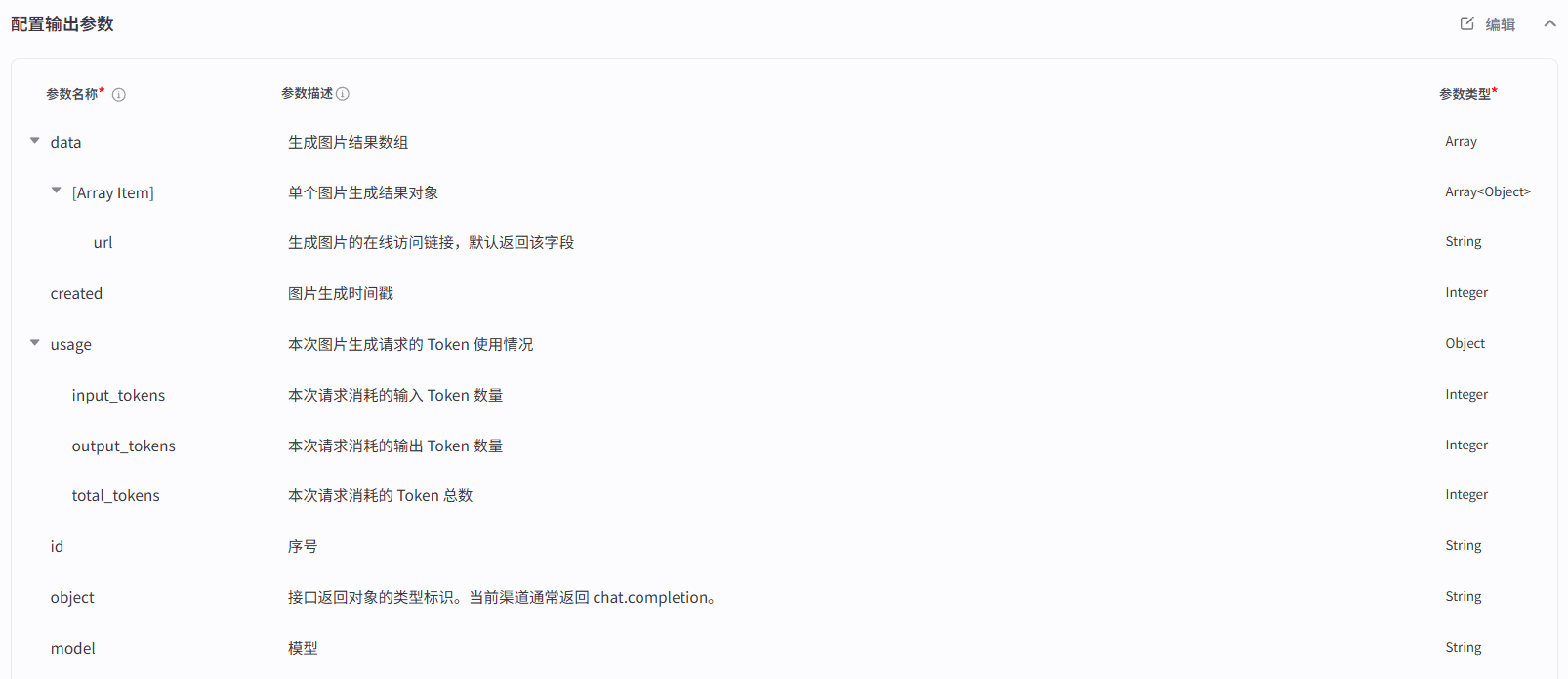
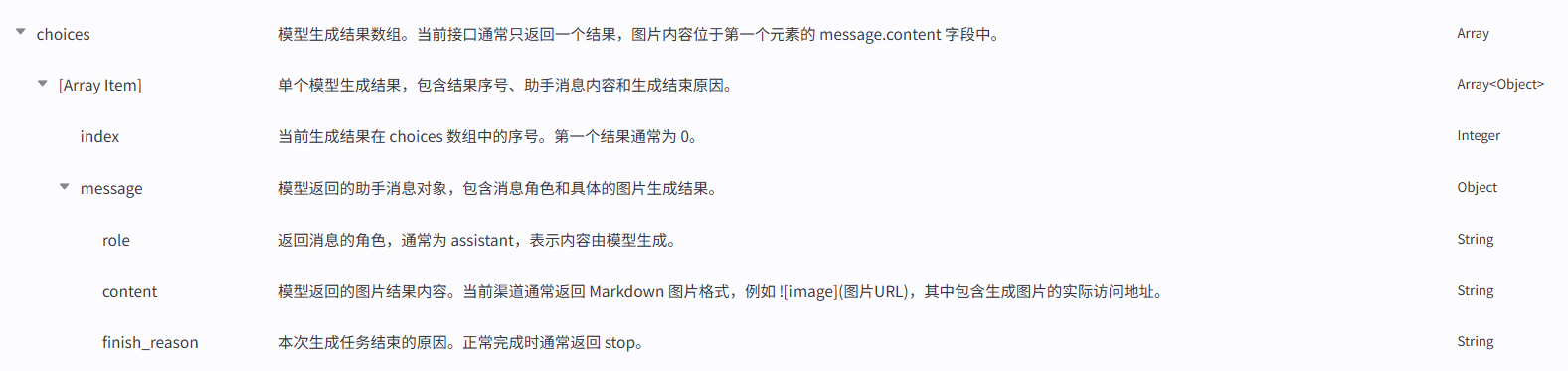
Step 5: Test and publish
- Fill in test parameters in the Coze IDE (start with
quality=low+resolution=1K+ a simple prompt to verify the APIYI pipeline) - Once tests pass, click ‘Publish’ and drag the plugin into any workflow
Error Classification Strategy
The plugin does not just reportsuccess=True/False — it classifies the failure cause in the following priority order, so your Coze workflow can branch accordingly:
Two-Stage Content Filtering
GPT Image 2 uses two-stage content-safety filtering, unlike Nano Banana Pro:Common moderation_blocked Triggers
APIYI-Specific Errors
Expected Latency by Resolution/Quality
Recommendation: useresolution=1K + quality=mediumfor day-to-day work (20-40 s per image), andresolution=4K + quality=highfor final deliverables. Withquality=auto(omitted or set to auto), the plugin applies a uniform 360-second timeout, and the API decides the actual quality level.
Full Plugin Source Code
Below is the complete code ofcoze-gptimage2.py, ready to paste straight into the Coze IDE. Only the OSS configuration at the top needs to be changed before use.
Optional: gpt-image-2-all Fast Mode
If you need faster generation (30-60s) and do not care about size parameter control, you can switch the plugin to APIYI’sgpt-image-2-all (reverse edition), called via the Chat Completions endpoint. This mode costs $0.03/image and returns image URLs directly, with no base64 parsing needed.
The core change (just replace the generate_image function):
How to switch: replacegenerate_image(...)inhandler()withgenerate_image_chat(...). The only inputs needed areprompt,apikey, and optionallyfileurls.
Using It in a Coze Workflow
After publishing the plugin, drag the plugin node into the Coze workflow editor and wire it up as follows:Comparison with Nano Banana Pro
FAQ
Where is the full source code? Can I just copy it?
Where is the full source code? Can I just copy it?
coze-gptimage2.py. Just change the OSS configuration and API_BASE at the top and paste it straight into the Coze IDE — nothing else to request.If you also need:- The Feishu field shortcut code → see the ‘Full Feishu Field Shortcut Source Code’ section in the Feishu Base AI image generation solution
- The Nano Banana Pro plugin → see the Nano Banana Pro Coze plugin
Why is apikey passed in as an input instead of hard-coded?
Why is apikey passed in as an input instead of hard-coded?
How does an APIYI API Key differ from an official OpenAI Key?
How does an APIYI API Key differ from an official OpenAI Key?
sk-, but:- Direct access from mainland China, no VPN required
- Requested and managed in the APIYI console
- Supports daily/monthly quota limits, making cost control easy
- One Key works for both Nano Banana Pro and GPT Image 2
What is the difference between the three routes?
What is the difference between the three routes?
API_BASE variable in the code to switch.Why go through OSS instead of returning base64 directly?
Why go through OSS instead of returning base64 directly?
How do I handle a MODERATION_BLOCKED error?
How do I handle a MODERATION_BLOCKED error?
- Rewrite the prompt wording
- Avoid real-person names, copyrighted character names, and names of living artists
- Avoid sexual innuendo, violence, gore, and other sensitive descriptions
How do I troubleshoot NO_IMAGE_DATA or NO_DATA?
How do I troubleshoot NO_IMAGE_DATA or NO_DATA?
content_filter). Suggestions:- Redesign the entire visual scene rather than tweaking wording
- Try a completely different prompt direction
- Lowering quality can sometimes get past the stricter output filter
high quality keeps timing out?
high quality keeps timing out?
- Debug your prompt with
quality=mediumfirst - Check the APIYI console for rate limiting
- Try switching routes and retrying
- Reduce the number of concurrent calls
- Consider the
gpt-image-2-allmode (30-60s per image)
Is transparent background supported?
Is transparent background supported?
gpt-image-2 accepts background: "transparent", and calling the API directly returns a real alpha-channel image — see How do I generate images with a transparent background.To get transparency inside the plugin you have two options: edit the plugin source to add "background": "transparent" to the request body (and make sure output_format is png or webp), or switch to the Nano Banana Pro plugin.Is the thinking reasoning-depth parameter supported?
Is the thinking reasoning-depth parameter supported?
thinking is not among the parameters APIYI supports. For fine control over output quality, use the quality parameter (low / medium / high / auto) instead.Other unsupported parameters include:response_format— the response always returnsb64_jsonn— fixed at 1background: "transparent"— the model supports it, but this plugin does not expose the parameter; edit the source to pass itinput_fidelity— locked to high; passing it returns a 400 error
Should I pick GPT Image 2 or Nano Banana Pro?
Should I pick GPT Image 2 or Nano Banana Pro?