

Quick Answer
Log in to the APIYI console, go to the Profile page atapi.apiyi.com/account/profile, and click the Delete Account button at the bottom of the page under “Account Options”. A confirmation prompt will appear to finalize the action.
Where to Find It
The deletion button is located at the bottom of the Profile page, in the Account Options section — next to “Change Password”, “System Tokens”, and “Access Tokens”: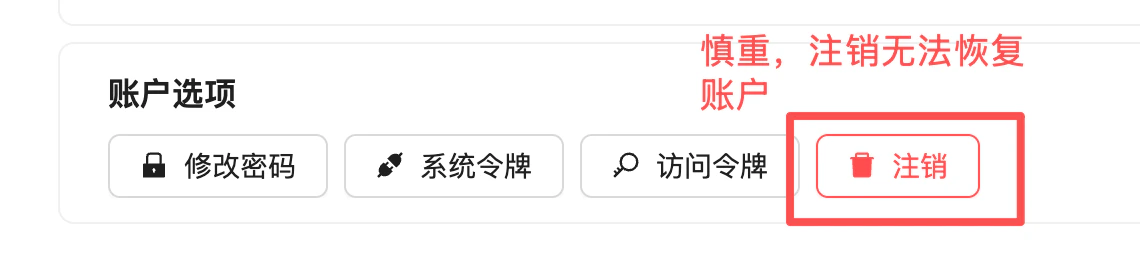
Steps
1
Go to Profile
After logging in to the APIYI console, visit your Profile page:
2
Find the 'Account Options' Section
Scroll to the bottom of the page and locate the “Account Options” section.
3
Click 'Delete Account'
Click the red Delete Account button (with the trash icon).
4
Confirm in the Dialog
A confirmation dialog will appear. Read it carefully before confirming. Once confirmed, the action takes effect immediately and cannot be undone.
Before You Delete
Account Balance
Any remaining balance will be wiped and is non-refundable after deletion. Consider spending it or requesting a refund first.
Usage Logs
All historical call records will be deleted and cannot be used for later reconciliation or auditing.
Recharge Records
Invoices and order history will be lost along with the account. Export or request invoices in advance.
API Keys
All system and access tokens will be invalidated immediately. Any live workloads using them will fail right away.
FAQ
Can I re-register with the same email after deletion?
Can I re-register with the same email after deletion?
In most cases the email will be released and available for re-registration. However, the new account has no connection to the old one: balance, logs, recharge records, and promotional eligibility will not carry over. For special cases, please contact customer service on WeChat.
My account still has a balance — can I get a refund after deletion?
My account still has a balance — can I get a refund after deletion?
If you need a refund, please apply for one based on the Refund Policy before deleting the account. Once deleted, the balance cannot be recovered and refund requests will no longer be accepted.
I clicked 'Delete Account' by mistake. Can I undo it?
I clicked 'Delete Account' by mistake. Can I undo it?
There is a confirmation dialog, so simply clicking the “Delete Account” button does not delete immediately. However, once you confirm in the dialog, the action is immediate and irreversible. Read the dialog carefully before confirming.
I just don't want to use it for now — is there an alternative to deletion?
I just don't want to use it for now — is there an alternative to deletion?
If you only plan to pause usage temporarily, deletion is not necessary:
- You can disable or delete API Keys in the “System Tokens” section to prevent accidental use
- Your balance will remain in the account and be available next time you log in
- This preserves your history and records, and saves you from re-registering later
I forgot my password and can't log in. How do I delete my account?
I forgot my password and can't log in. How do I delete my account?
First recover your account using the steps in Forgot Password?, then proceed with deletion. If you cannot recover access, please contact customer service on WeChat for assistance.
Related Documents
Refund Policy
Review the refund rules before deletion
Forgot Password?
Password recovery and reset
Data Security
Learn about APIYI’s data security and privacy policies
Call Logs
Export your usage history before deletion