

Quick Answer
APIYI does not have a separate “agent partnership” application channel. Instead, every user has access to the built-in referral rebate program: grab your invite link / invite code from the Account Center, and you’ll earn a continuous 5% credit rebate on every friend you successfully invite.Rebates are issued as in-platform credits (API usage balance). They cannot be withdrawn — they can only be spent on your own API calls.
Where can I find my invite link and invite code?
1
Open the Account Center
After signing in, go directly to the Account Center / Profile page
2
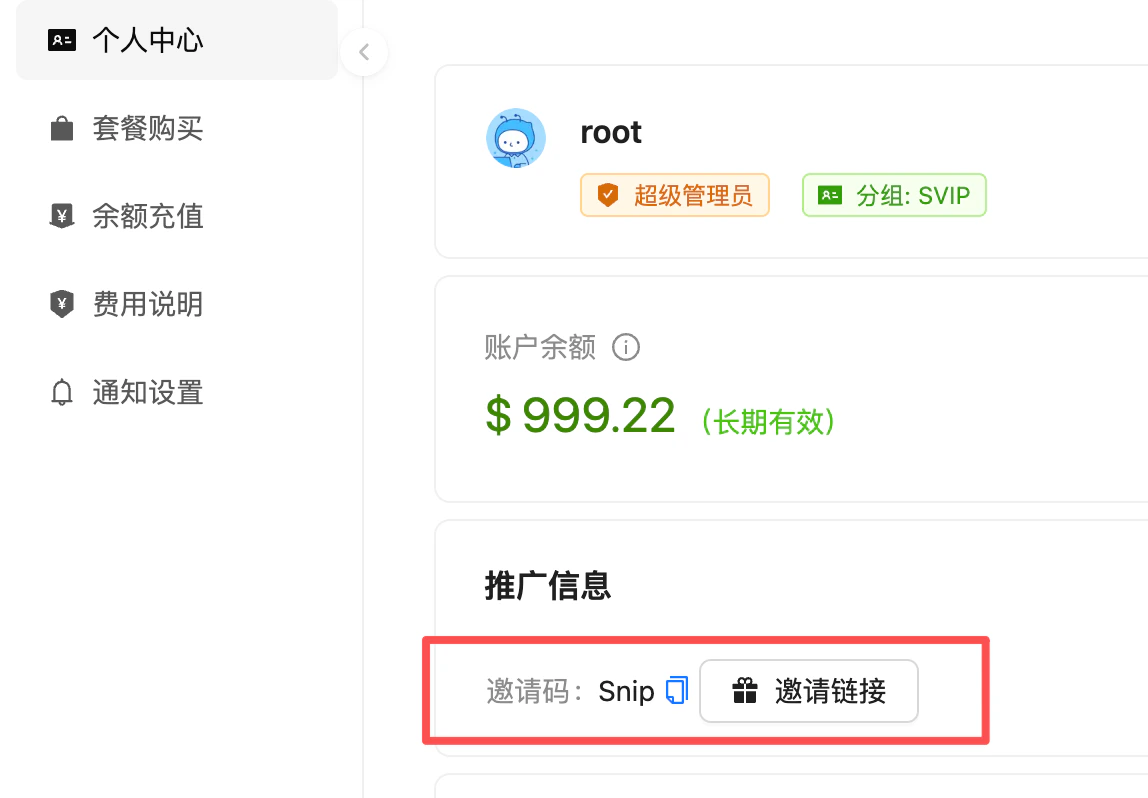
Locate the "推广信息 / Referral Info" section
Scroll to the 推广信息 (Referral Info) card on the page — you’ll see your Invite Code and an Invite Link button
3
Copy your invite link / invite code
Click to copy, then share with your friends
How do rebates arrive and get spent?
Each time an invitee completes a recharge, your share is credited to your Reward (奖励金) balance. You can then manually transfer the reward into your main API balance, after which it can be spent on regular API calls.Track your rebate history: in the Logs page, filter by Type = 奖励金划转 (Reward Transfer) to see each rebate entry along with its source and amount.
How the rebate works
Rebate Rate
5% credit rebateEarn an ongoing rebate on every recharge and spend by the friends you invited
Ongoing Payouts
Long-term effectiveAs long as the referral relationship is established, rebates are continuous — not a one-time payout
Rebate Format
In-platform creditRebates are deposited directly as API usage balance — not withdrawable as cash
Usage Scope
All modelsRebate credits can be used to call any model on the platform
What if the invite link loses the referral relationship at signup?
In some browsers, private/incognito modes, or redirected flows, the cookie/parameter from the invite link can be lost, so the referral relationship may not be established automatically. In that case, your friend can bind it manually:1
Open the registration page
Have your friend visit the APIYI signup page
2
Fill in the "Invite Code" field
On the registration form, enter your personal invite code in the Invite Code field
3
Complete registration
Submit the form — the referral relationship will be established successfully
FAQ
Can rebate credits be withdrawn as cash?
Can rebate credits be withdrawn as cash?
No. Rebates are issued as in-platform API usage credits — for your own use only. They cannot be withdrawn to a bank account, WeChat, or Alipay.
Is the rebate one-time or ongoing?
Is the rebate one-time or ongoing?
Ongoing. As long as the referral relationship is in place, every recharge and spend by your invitee continues to generate a 5% rebate to your account at the current rate.
Are friends who signed up earlier settled at 10% or 5%?
Are friends who signed up earlier settled at 10% or 5%?
Settlement always follows the current rule — rebates earned after May 15, 2026 (UTC+8) are calculated at 5%. Rebates already paid before that date are not retroactively adjusted.
Can enterprise users get a higher rebate rate?
Can enterprise users get a higher rebate rate?
No. Both enterprise and individual users are settled uniformly at 5% — no tiered or custom rates are offered.
Can I invite my own alt accounts to farm rebates?
Can I invite my own alt accounts to farm rebates?
Self-invitation is strictly prohibited. The platform identifies suspicious accounts via multiple signals including IP, device fingerprint, and payment information. If detected:
- The platform reserves the right to unilaterally cancel the referral relationship
- Any suspicious rebates already paid out may be reclaimed or frozen
- Severe cases may trigger account risk-control actions
How can I check my invitees and rebate history?
How can I check my invitees and rebate history?
Open the Account Center to view your invitee data. For per-transaction rebate entries, go to the Logs page and filter by Type = 奖励金划转 (Reward Transfer).
Related Docs
Recharge Promotions
First-recharge bonuses, tiered bonuses, and other recharge offers
Payment Methods
Supported payment channels and corporate bank transfer instructions