

Official policy (effective 2026-08-02)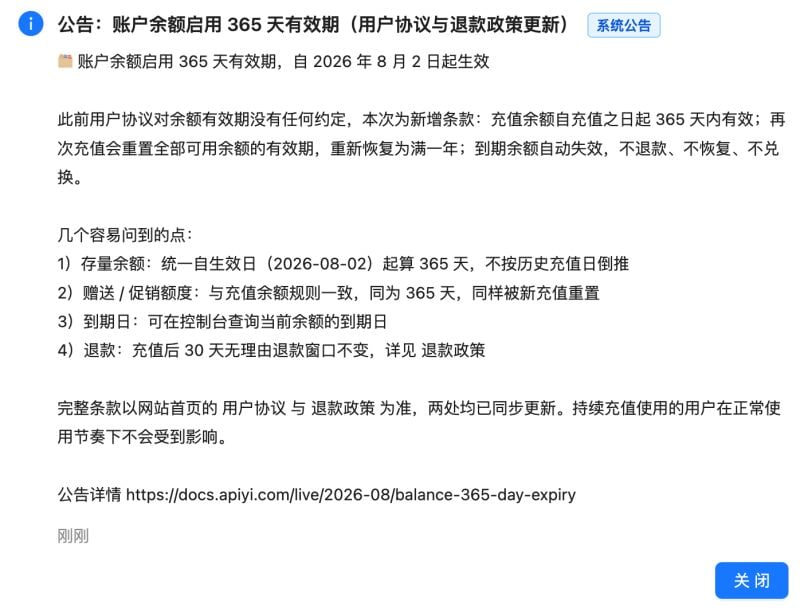
Details
- Validity length: 365 days from the credit date.
- Start time: the time when the recharge is credited to your account, shown on the console’s “Funds” page.
- Existing balances: a unified baseline of 2026-08-02 is used — historical recharge dates are not retroactively applied.
- Stacking rule: a new recharge resets the validity of all available balances back to a full year (the next “expiry baseline” is the latest recharge credit time).
- Promo credits: limited-time promotional credits follow the same 365-day rule and are also reset by a new recharge.
- Enterprise accounts: bank-transfer recharges follow the same 365-day rule and reset behavior.
Specific scenarios / steps
Scenario 1: How to check my balance validity
1
Log in
Sign in to the APIYI console.
2
Open Funds
Click “Funds” / “Account balance” in the left menu.
3
Check the expiry column
Since 2026-08-02 the “Funds” page lists the expiry date for every account.
Scenario 2: How will I be alerted before expiry
- In-app message at day 335 / 358 / 364.
- Email to your registered address with subject “[APIYI] Your balance is about to expire”.
- WeCom notification if you have linked your account.
Scenario 3: Can an expired balance be restored?
- No, expired balances cannot be restored or refunded as cash.
- The account is not closed. A new recharge reopens usage immediately.
- If you believe an expiry was incorrect, contact support within 30 days of expiry with the recharge order ID and a console screenshot.
Scenario 4: How to avoid letting balance expire unused
FAQ
Is the validity 365 days or unlimited?
Is the validity 365 days or unlimited?
365 days from credit since 2026-08-02. If the policy changes, we will announce it on the “Recharge promotions” page and the Live banner first.
Does a new recharge reset old balances?
Does a new recharge reset old balances?
Yes. The official announcement is explicit: a new recharge resets the validity of all available balances back to a full year.
Do enterprise bank-transfer balances follow the same rule?
Do enterprise bank-transfer balances follow the same rule?
Yes — 365 days, and a new recharge also resets all available balances.
Will I always be notified before expiry?
Will I always be notified before expiry?
- Email: yes.
- In-app message: yes.
- WeCom: only if bound. Binding does not affect the other two channels.
Can an expired balance be restored?
Can an expired balance be restored?
No. Please use the balance before expiry or contact support; raise disputes within 30 days of expiry.
Related
- Why is my request failing with balance left?
- Balance alerts
- Refund policy
- Recharge promotions
- Announcement: 365-day balance validity
Contact
- WeCom support
- Email: [email protected]