

Short Answer
A key’s maximum spending power is your account balance — meaning that if any single key leaks, your worst-case loss is everything left in your account. Securing your keys comes down to four things: issue separate keys per purpose, give each key a permission boundary, cap how much any single key can spend, and keep keys out of anywhere someone else could see them.1. Give the Token a Permission Boundary
When creating a token, tick “Enable Advanced Options” to reveal the IP whitelist and available-models settings.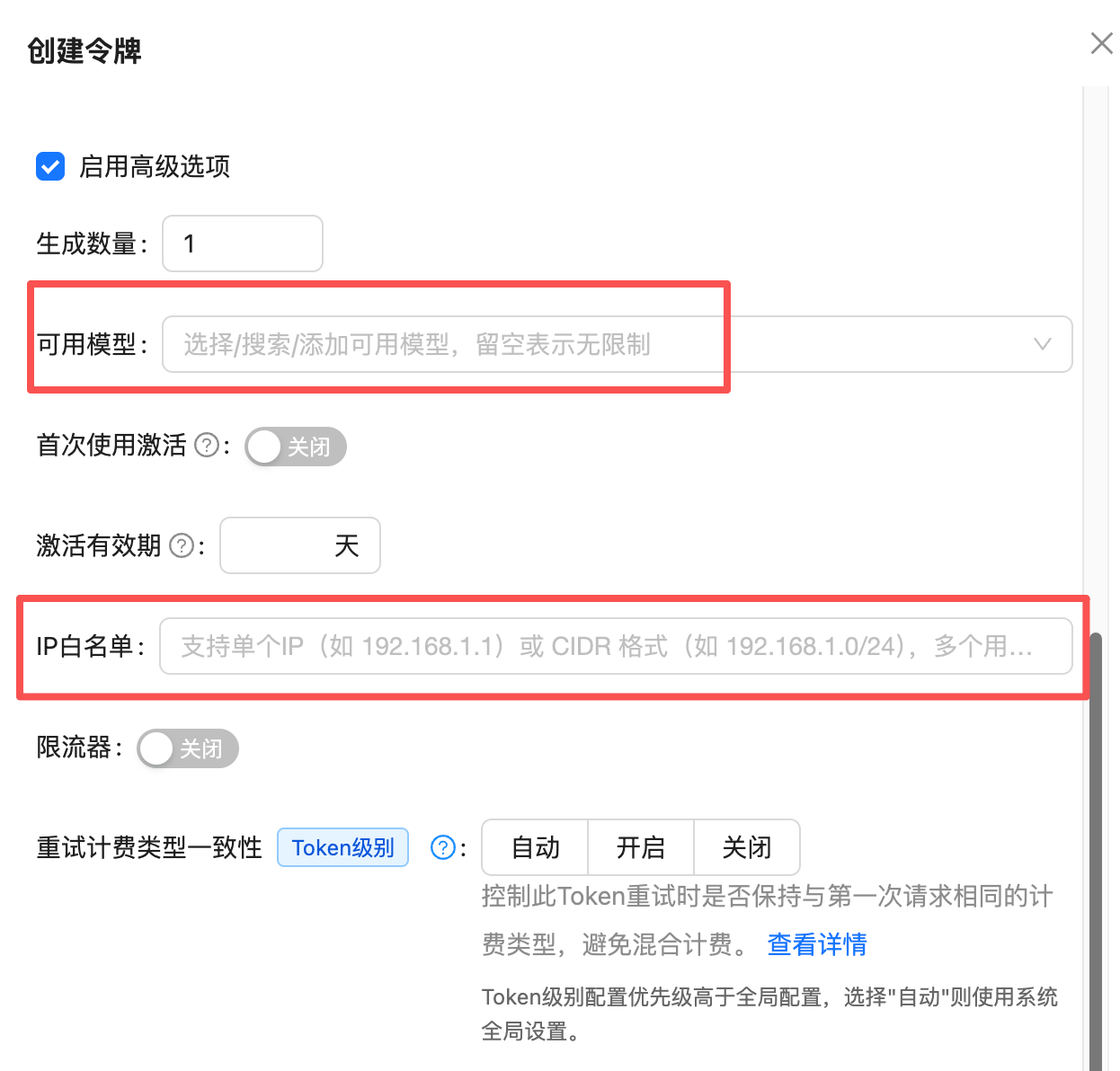
IP Whitelist (Recommended for Production)
This is the strongest protection available. Once set, only requests from the specified IPs can use the token — even if the key leaks, it is useless from any other machine.Available-Models Whitelist (For Dedicated Tokens)
Leaving “Available Models” empty means no restriction — the token can call any model on the platform. Once you fill it in, the token can only use the models you listed. This cuts both ways:Good fit
Single-purpose tokens: a service that only generates images, a token shared with an outside collaborator, or per-model budget isolation.
Poor fit
Everyday personal use and exploratory testing. You have to return to the console every time you switch models, and mismatched model aliases can break calls.
In most cases we do not recommend setting available models. See Do I Need to Set Available Models on a Token? for the full trade-off analysis.
2. Set a Spending Cap on the Token
This one applies to everyone, and doubly so for test keys. When creating the token, switch off “Unlimited Quota” and enter an amount under “Authorized Quota” — or use one of the presets below the field ($5 / $20 / $50 / $100 / $200 / $500).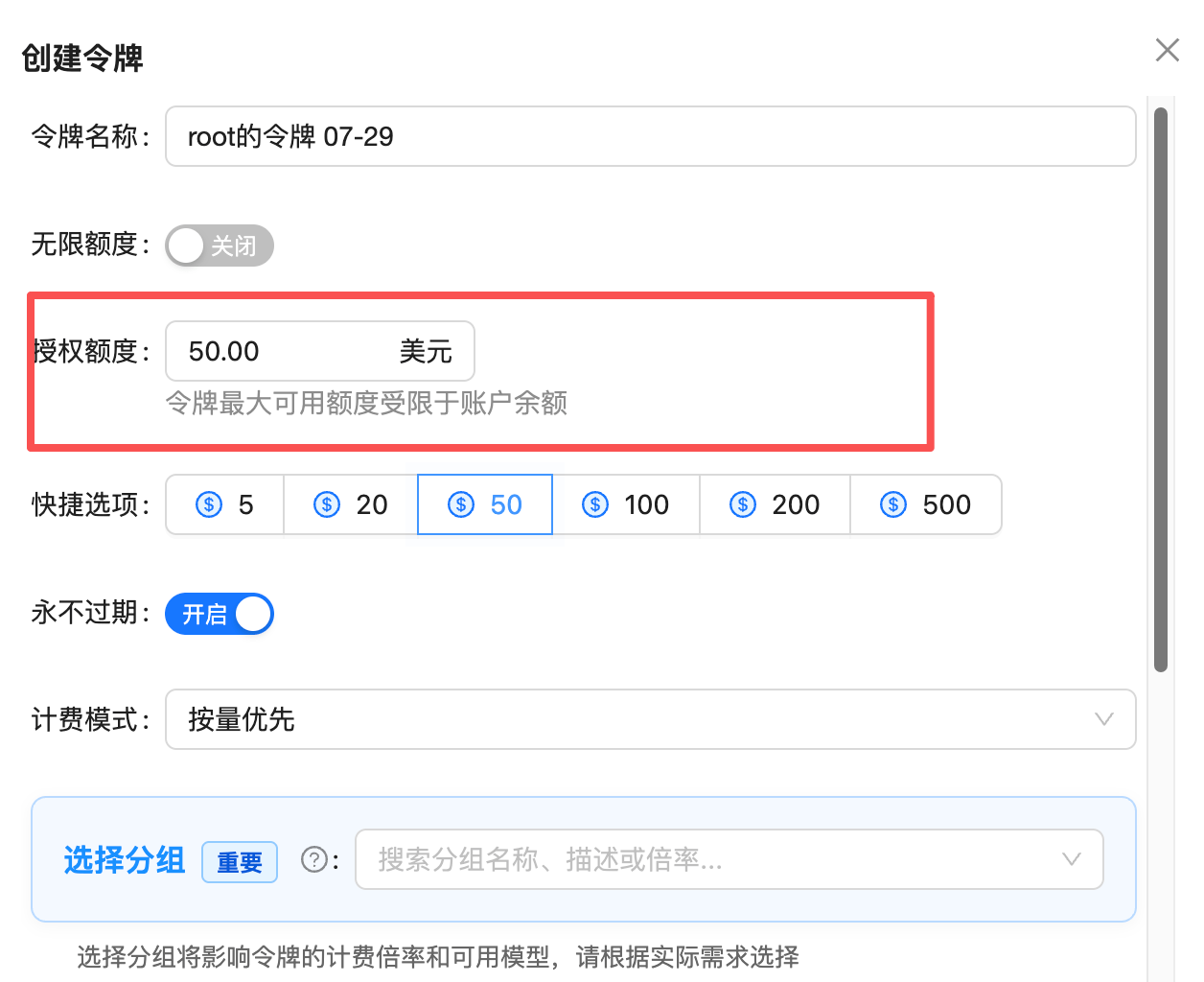
- A leaked key with a $20 quota costs you at most $20
- A leaked key with “Unlimited Quota” on can cost you your entire account balance
A token’s maximum spending power is limited by your account balance. Setting a $500 quota does not reserve or freeze that money — it is purely a ceiling on that token’s consumption. What it can actually spend still depends on the balance available.
3. Keep Production and Test Keys Separate
Never use one key for both live traffic and local testing. Once they are separate, you can disable a misbehaving test token outright without touching production.4. Keep Keys Out of These Places
Code Repositories
This is the most common leak path by far. Once a key is committed to Git, it stays in the commit history even after you delete the file, and anyone with repository access can dig it out. Read from environment variables instead:.env to .gitignore, and scan before you commit. This command works as a self-check:
The
(^|[^A-Za-z0-9]) prefix in that pattern matters. Without it, the sk- inside ordinary words like task-, risk-, and disk- produces a flood of false positives that buries the real findings.Public Docs, Screenshots, and Logs
Before publishing documentation or a technical write-up, review the prose, the code samples, and the screenshots. Console screenshots, terminal recordings, and error logs all routinely carry a full key. Use a placeholder such assk-your-api-key in every example.
Conversations with AI and AI Agents
This risk path is only a couple of years old, and it is the one most often underestimated. Pasting a key into a chat box feels temporary, but in practice:Transcripts hit the disk
AI coding tools typically store the full conversation as plaintext files on your machine, retained indefinitely and never cleaned up automatically.
Resuming re-transmits
Resuming an old session sends the entire transcript again as context, so the key is not sitting still.
File snapshots duplicate it
These tools often snapshot files before and after edits, so a script containing a key ends up copied several times over.
Any local process can read them
Those files are readable by any program running as you — a weaker boundary than your code repository has.
What to Do If a Key Has Already Leaked
1
Delete or disable the token immediately
Go to the token page and delete or disable the affected token. This is the only action that stops the bleeding right away, and it comes before any investigation.
2
Create a replacement token
Issue a new token — this time with a spending cap and whatever permission boundaries apply — and update your application config.
3
Check the logs for impact
Review your call logs for anomalies during the exposure window: unfamiliar models, unusual volume, or requests at hours you were not working.
4
Clean up the source of the leak
Track down where the key actually leaked — code, docs, screenshots, chat transcripts — and clean each one out. Otherwise the replacement key leaks the same way.
Common Questions
I set an IP whitelist and now every call fails. What went wrong?
I set an IP whitelist and now every call fails. What went wrong?
Most likely the wrong IP. You need the server’s public egress IP, not an internal address like
192.168.x.x.If you are calling from home broadband or an office network, the egress IP rotates with your ISP, and such environments are a poor fit for IP whitelisting — use a spending cap instead.To troubleshoot, clear the IP whitelist first, confirm calls recover, then add the correct IPs back one at a time.Does setting a quota deduct or freeze money up front?
Does setting a quota deduct or freeze money up front?
No. An authorized quota is only a spending ceiling for that token, not a prepayment or a hold.You can give five tokens a $100 quota each while holding only $50 in the account — they share that $50, and once it runs out none of them work. A token’s maximum spending power is always bounded by the account balance.
How many tokens can one account create?
How many tokens can one account create?
There is no limit; create as many as you need.We suggest splitting them along project plus environment lines, e.g.
prod-support-bot, prod-image-service, test-model-eval. Finer-grained tokens let you disable exactly one without disrupting anything else, and each token’s spending and logs can be reviewed independently.Once a token's quota is used up, is it dead?
Once a token's quota is used up, is it dead?
No. Calls are rejected once the quota is exhausted, but the token itself remains. Just edit the token and raise the authorized quota in the console to resume — no need to create a new one or update your config.That is part of why a spending cap is worth setting: it is a recoverable brake, not a one-way destruction.
How can I tell whether someone else is using my key?
How can I tell whether someone else is using my key?
Check the call logs. Three signals matter most: models you never use, calls outside your working hours, and request volume that does not match your workload.See How Do I Investigate Unexpected Key Usage? for the full procedure.
Related Docs
Tokens and Groups
Full reference on creating, editing, and grouping tokens.
Token Model Whitelist
Whether to set available models, and what to watch out for.
Investigate Key Usage
Use logs to pin down the real caller behind unexpected usage.
Platform Data Security
How APIYI encrypts traffic and protects your data on the platform side.
Security is never a small matter. Every setting above lives on the token management page — a few minutes of configuration blocks the large majority of the risk.